Zoom . Google Meet . Teams . Uploads

Every meeting turns into work that actually gets done.

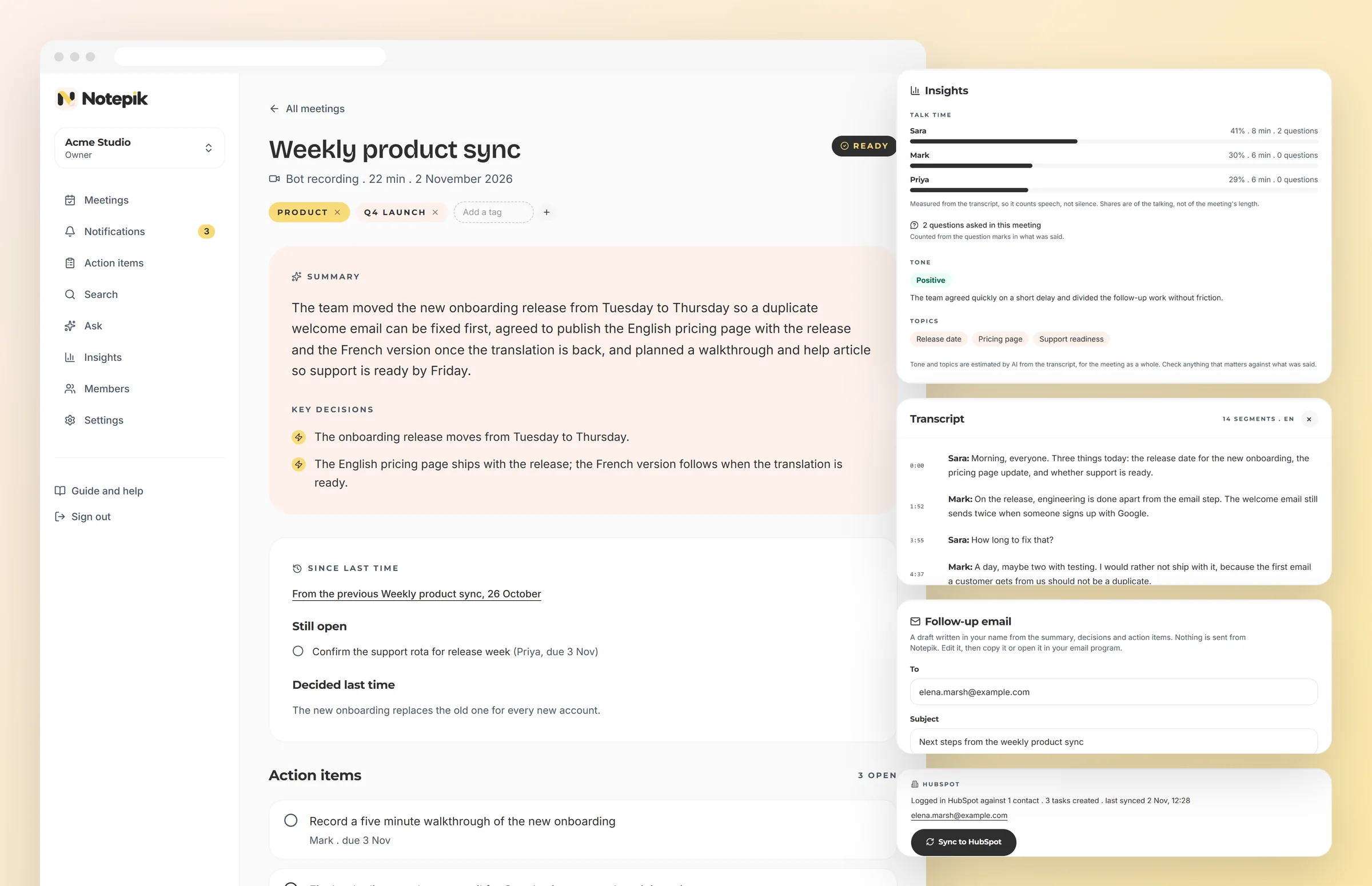
Notepik joins the call or takes the recording you already have, writes the notes, and pulls out the decisions and the follow-ups with a name and a date attached. Your team opens one page instead of scrolling a recording.

Your recordings stay in your workspace. Never used to train models.

Q3 Roadmap Review

Google Meet . 47 min . 6 participants

Ready

Executive summary

The team agreed to delay the billing migration by two weeks so the mobile onboarding rework can ship first. Pricing stays unchanged until the Q4 review.

Action items

Draft the migration rollback plan

Fri

Rewrite onboarding step 3 copy

Tue

Confirm Q4 pricing review date

Today
Ready in 90 seconds
The actual problem

Meetings are not the problem. Forgetting them is.

Every team has had the conversation where something was clearly agreed, and nobody can say later who was supposed to do it.

Someone volunteers to take notes

They stop contributing, and the notes are still patchy

The recording is saved for later

Nobody rewatches an hour to find the ninety seconds that mattered

Action items land in a chat message

Scrolled past by Thursday, remembered by nobody

The decision is clear on the call

Three weeks later two people remember it differently

None of that is a discipline problem. It is a tooling problem.

How it works

Three steps, then you stop taking notes forever

No plugin to install, no one nominated as the note taker, no scrambling afterwards to remember who agreed to what.

  1. 01

    Send the bot, or upload

    Paste the meeting link and Notepik sends a bot into the call, with nothing to install for anyone. Already recorded it? Upload the file instead.

  2. 02

    It listens and writes

    A diarised transcript with speaker labels, then a summary and the decisions that were actually made, not a wall of text.

  3. 03

    The work gets assigned

    Every follow-up comes out with a suggested owner and a due date. Confirm in one click and it lands on their list.

Features

Built for the meeting after the meeting

Recording a call is the easy part. Notepik is designed around what your team needs once the call is over.

Action items with a name on them

Notepik cross-references who was speaking to suggest an owner, then proposes a deadline from what was said in the room. Reassign, snooze or mark done from the meeting page or from Slack.

Suggested ownerDue dateSlack pushAsana sync

Search across every meeting you have ever had

Ask what the client said about the renewal in March and get the exact moment, the speaker, and a link straight to that second of the recording.

what did we promise on pricing?
every blocker raised this quarter
decisions from the vendor calls

Speaker labels

Diarised transcripts so you can see exactly who said what, and hold the right person to it.

Digests that land

A daily or weekly email with what is still open and who is sitting on it. Opt in per person.

Comments and mentions

Discuss a decision on the line where it was made.

Every meeting, one library

Searchable across months of calls, not one at a time.

Usage you can see

Hours processed and cost per workspace, live.

Roles that hold

Owner, admin, member, viewer. Enforced in the database.

Cross-meeting search

“When did we agree to that?” now has an answer

Search runs across meeting titles, summaries and every line anybody said. You get the matching phrase highlighted and a timestamp, so you land on the exact moment instead of scrubbing a recording.

  • Postgres full-text search, so it is fast on a year of meetings
  • Results never cross a workspace boundary
  • Filter down to one client or project with tags

90s

From call ending to notes in your inbox

40+

Languages transcribed and summarised

3

Platforms covered, plus any recording you upload

0

Recordings used to train any model

Integrations

The follow-ups end up where your team already works

A summary nobody opens is not much better than notes nobody wrote. When a meeting is written up, Notepik pushes the result into the tools you already have open.

Slack
One message per meeting with the summary, decisions and action items, in whichever channel you point it at.
Asana, Trello, ClickUp
One task or card per action item, carrying the owner, the due date and a link back to the moment it came from.

A push that fails never loses the meeting. The transcript and summary are already saved, and a failed push is retried in the background rather than silently dropped.

Shared by default

One workspace, not twelve private notebooks

Invite the whole team. Everyone sees the same summary, the same decisions, and the same list of what is outstanding. Nobody has to ask what happened on the call they missed.

  • Invite by email with a role attached
  • Tag meetings by client, project or squad
  • Push action items into Slack, Asana or Trello
Create your workspace

Key decisions

  • Billing migration moves to 12 Oct
  • Mobile onboarding ships first
  • Pricing frozen until Q4 review
Who it is for

Five teams, five different reasons

What an agency needs from a client call is not what a research team needs from an interview.

Agencies

Client calls you can bill against

Product teams

Planning without a scribe

Sales

Discovery that survives handover

Research

Interviews you can query

Managers

One-to-ones that stick

Trust

Your transcripts are one of the most sensitive things you own

A recording of a business meeting can contain anything anyone said about customers, staff, money or plans. We built for that rather than adding security later.

Isolation the database enforces
Every table carries a workspace id and Postgres row-level security refuses anything else. A query that forgets to filter returns nothing rather than somebody else's meeting.
Never training data
We do not train models on your meetings and our providers are contractually barred from it. Nobody here reads your transcripts.
Encrypted, and signed links only
Recordings sit in a private bucket with no public URL. Playback goes through short-lived signed links issued after a membership check.
Read the security page

Including what we have not done yet, which most security pages leave out.

What changes

The follow-up stops being somebody's memory

We used to end every call agreeing on things nobody wrote down. Now the follow-ups are assigned before anyone has left the room.

Operations lead

12-person agency

I stopped attending two recurring meetings entirely. I read the summary in ninety seconds and my action items are already on my list.

Product manager

B2B SaaS

Searching across a year of client calls is the part I did not expect to need and now use daily.

Account director

Consultancy

replace these with real quotes before launch

Pricing

Priced per workspace, not per person you had to invite

Start on the free tier with no card. Move up when your team is actually using it.

Free

For trying it on a few real calls.

Freeforever

  • 1 hour of meetings per month
  • Up to 3 seats
  • Every feature included, nothing locked to a paid tier
  • Summaries, decisions and action items on every call
  • Search across everything you have recorded
  • No card, and no trial clock running down
Start free

Starter

For small team with few meetings.

$14per month

Or $140 a year, 2 months free

  • 8 hours of meetings per month
  • Up to 3 seats
  • About eight one hour calls a month
  • Ask a question across every past meeting and get a cited answer
  • Push notes into Slack, Asana, Trello or ClickUp
  • Share a meeting by link, with or without the transcript
  • Daily or weekly digest of what was decided
Start with Starter
Most teams pick this

Team

For a team that meets constantly.

$29per month

Or $290 a year, 2 months free

  • 20 hours of meetings per month
  • Up to 10 seats
  • About a meeting a day, for a team that actually meets
  • Custom summary templates, so a standup and a sales call read differently
  • Calendar auto join for Google and Microsoft
  • Comment and @mention teammates on any moment in a transcript
  • Tag by client, project or squad and filter the whole library
Start with Team

Business

For multiple squads and clients.

$79per month

Or $790 a year, 2 months free

  • 60 hours of meetings per month
  • Unlimited seats
  • Enough hours for several squads recording daily
  • Four roles, including view only for clients and stakeholders
  • One searchable library across every team in the workspace
  • Bring in everyone who reads the notes, not just who records
  • Export any meeting to Markdown or PDF
Start with Business

See what is included in each plan

FAQ

The things people ask before signing up

Which meeting platforms does Notepik support?+

Zoom, Google Meet and Microsoft Teams, through a bot participant, so there is nothing to install on anyone's machine. For an in-person meeting or any other tool, upload the recording instead and you get the same summary and action items.

Can I upload a recording I already have?+

Yes. Upload an audio or video file up to 2 GB: mp3, m4a, wav, flac, mp4, mov or webm. Speakers are labelled automatically, a one-hour file is usually written up within a few minutes, and it counts toward your monthly hours exactly like a live call.

Do the other people on the call know they are being recorded?+

Yes. The bot appears as a named participant in the attendee list for the whole call, which is what most recording consent rules require. You can rename it to match your company.

How accurate are the action items?+

The model extracts a follow-up only when someone commits to something specific, and it attaches the speaker it heard commit. Every item is a suggestion until a human confirms the owner and the date, which takes one click.

Is my meeting data used to train AI models?+

No. Recordings, transcripts and summaries stay inside your workspace and are never used as training data. Each workspace is isolated at the database level with row-level security, not just filtered in application code.

What happens when I run out of included hours?+

Processing pauses rather than silently billing you. You will get a warning as you approach the limit and can upgrade from the billing page at any point in the month.

Can I cancel whenever I want?+

Yes, from the customer portal, with no call required. Your data stays available for export throughout the notice period.

Your next meeting can write itself up

Connect a calendar, run one real call, and see the summary land before anyone has opened their laptop again.

Start free

No card. Three meetings on the house.